
| Software | ANSYS 2026 R1 |
| Developer | ANSYS |
| OS | Windows |
| Lisensi | Freeware |
| Language | Multilingual |
Download ANSYS Full Version Kuyhaa Gratis untuk PC Windows –ANSYS 2026 R1 Student is an engineering simulation software package designed for students who want to explore computational fluid dynamics, structural analysis, and engineering design. With Fluent capabilities, users can study fluid flow, heat transfer, and complex physical processes through numerical simulations. ANSYS helps students understand engineering concepts, visualize simulation results, and develop practical technical skills using a digital engineering environment.

ANSYS 2026 R1 Student Fluent Software Download – KuyhAa
ANSYS is a powerful engineering simulation platform used to evaluate the behavior of different systems under various physical conditions. Its Fluent module is particularly useful for computational fluid dynamics simulations, allowing users to investigate fluid movement, pressure distribution, temperature changes, and other flow-related phenomena. By using numerical methods, engineers and students can study problems that would otherwise require expensive experiments or complicated physical testing.
The Student version provides an accessible way to learn engineering simulation techniques and explore computational tools for academic projects. Students can work on simplified models, define simulation parameters, examine results, and improve their understanding of engineering processes. ANSYS 2026 R1 Student can be useful for mechanical engineering, aerospace studies, thermal analysis, fluid mechanics, and other technical learning activities where simulation plays an important role.
ANSYS Fluent offers a flexible simulation environment for solving fluid flow and heat transfer problems. Users can prepare geometry, generate meshes, define materials, configure boundary conditions, select appropriate numerical models, and perform calculations. The resulting data can be visualized through contours, vectors, plots, and other analysis tools. ANSYS Kuyhaa is a relevant search keyword for Indonesian users looking for information about the software, its student edition, installation, and Fluent functionality.
For students learning CFD, ANSYS provides a workflow that connects model preparation, simulation setup, calculation, and post-processing. This workflow helps users understand how engineering assumptions influence simulation results. Although numerical simulations can provide valuable insights, their accuracy depends on mesh quality, boundary conditions, physical models, solver settings, and proper interpretation. Therefore, ANSYS is best used alongside engineering fundamentals and careful validation. Anda juga dapat mengunduh: Kaspersky Total Security Kuyhaa
Fungsi ANSYS
Computational Fluid Dynamics Simulation
ANSYS Fluent is designed to simulate fluid flow in different engineering environments. Students can analyze how liquids and gases move through channels, pipes, ducts, external surfaces, and other geometries. The software provides tools for studying velocity, pressure, turbulence, and flow patterns, helping users understand fluid mechanics through numerical calculations and visual results.
Heat Transfer Analysis
Fluent can be used to investigate heat transfer involving fluids and solid regions within supported simulation setups. Users can study temperature distributions, thermal gradients, convection, and other heat-related processes. This function is useful for academic projects involving cooling systems, thermal equipment, heat exchangers, airflow management, and engineering applications where temperature behavior influences performance.
Engineering Model Analysis
ANSYS allows users to prepare computational models and evaluate how different physical parameters affect simulation outcomes. Geometry, materials, mesh settings, boundary conditions, and numerical models can be configured according to the engineering problem. This functionality helps students experiment with different design conditions and understand the relationship between modeling decisions and calculated results.
Simulation Results Evaluation
After completing a simulation, users can examine the calculated data through visualization tools and numerical reports. Fluent can display flow patterns, pressure contours, temperature distributions, velocity fields, and other supported variables. Reviewing these results helps students identify areas of interest, compare simulation conditions, and develop conclusions based on their engineering models.
Fitur Utama ANSYS
Fluent Simulation Environment
ANSYS Fluent provides an environment for setting up and solving computational fluid dynamics problems. It supports a range of fluid flow and heat transfer simulation workflows, allowing users to configure physical models, materials, boundary conditions, and solver parameters. Its flexible setup tools make it suitable for different educational and engineering applications.
Mesh-Based Modeling
Meshing divides a computational domain into smaller elements that can be used for numerical calculations. ANSYS supports mesh-based simulation workflows that help users prepare models for analysis. Mesh quality, resolution, and refinement can influence simulation accuracy and computational performance, making mesh evaluation an important part of the modeling process.
Visualization and Post-Processing
The software offers visualization tools for interpreting simulation results. Users can explore contours, vectors, graphical data, and other available representations to understand the behavior of simulated systems. These tools help transform numerical output into meaningful engineering information that can be used in reports, presentations, and academic research.
Multiple Engineering Applications
ANSYS simulation technology supports various engineering disciplines and physical problems. Depending on the installed modules and available license, users can explore CFD, thermal analysis, structural engineering, and other simulation workflows. The Student package is intended for educational use and may have limitations compared with commercial editions.
Academic Learning and Project Development
ANSYS Student gives learners an opportunity to practice simulation-based engineering without requiring a commercial enterprise license. It can help students develop modeling skills, investigate engineering problems, compare different configurations, and prepare technical project documentation. The educational environment is valuable for learning simulation concepts before using professional tools in industry.
How does ANSYS Work?
ANSYS Fluent works by solving mathematical equations that describe fluid movement, heat transfer, and other physical processes. The simulation process generally begins with preparing the geometry of the system that needs to be analyzed. This geometry represents the computational domain, such as a pipe, channel, enclosure, vehicle surface, or other fluid-related structure.
Once the geometry is prepared, users create a mesh that divides the domain into smaller computational regions. The mesh provides the structure needed for numerical calculations. Users then define materials, operating conditions, boundary conditions, and relevant physical models. Depending on the problem, these settings may include fluid properties, turbulence models, heat transfer options, and other simulation parameters.
After the simulation setup is completed, Fluent calculates the solution using numerical methods. The solver iteratively works toward a solution based on the configured equations and computational settings. Users can monitor convergence information and evaluate whether the simulation is behaving as expected. Once the calculations are complete, post-processing tools help visualize the results through contours, plots, vectors, and other data representations.
This workflow enables students to investigate engineering problems digitally, compare different scenarios, and learn how modeling choices influence calculated outcomes. Simulation results should always be interpreted carefully, and important engineering conclusions should be validated where possible using experimental data, analytical methods, or established engineering standards.
Apa yang Baru di ANSYS 2026 R1
- ANSYS 2026 R1 represents a newer release within the ANSYS simulation software series.
- Specific changes to Fluent, solver performance, supported workflows, and interfaces should be confirmed through the official release notes.
- Fluent continues to provide computational fluid dynamics workflows for supported engineering problems.
- The simulation workflow includes model preparation, meshing, solver configuration, and post-processing.
- Visualization tools help users examine simulation data and interpret calculated results.
- Student licensing and supported capabilities may differ from commercial ANSYS installations.
- Compatibility, installation options, and available modules depend on the specific Student package and system configuration.
Care Install ANSYS Full Kuyhaa
- Download ANSYS Kuyhaa Full Version for PC.
- Klik tombol unduh dan tunggu 10 detik.
- Sebuah halaman baru akan terbuka, unduh programnya dari sana.
- Untuk memudahkan pengunduhan, gunakan IDM Kuyhaa. Jika Anda mengalami masalah dalam mengunduh, lihat ‘Cara Download‘.
- Jika tautan unduhan tidak berfungsi, silakan beritahu kami di komentar, atau hubungi kami.
Cara Activate ANSYS
- Install ANSYS Student using the official installation package.
- Open the installed ANSYS application or licensing configuration interface if required.
- Follow the licensing instructions provided with the Student edition.
- Use the official Student license or licensing process according to the applicable terms.
- Check that the license configuration is recognized by the application.
- If the license is not detected, review the official installation and licensing documentation.
- Make sure your installed version and licensing configuration are compatible.
- Avoid unofficial activators, modified licensing files, or unauthorized patches that could compromise your computer or software installation.
ANSYS System Requirements
- Operating System: Supported 64-bit Windows version as specified by the ANSYS 2026 R1 Student documentation.
- Processor: 64-bit Intel or AMD processor compatible with the supported software requirements.
- Memory: RAM capacity appropriate for the size and complexity of your simulation; more memory is recommended for larger models.
- Storage: Sufficient available disk space for installation, project files, temporary solver data, and results.
- Graphics: Supported graphics hardware and drivers suitable for engineering visualization.
- Display: Screen resolution suitable for working with engineering interfaces and simulation tools.
- Internet Connection: Required or recommended for downloading the software, accessing documentation, and completing supported licensing procedures.
- Additional Requirements: Specific hardware and software requirements may vary depending on the installed components and simulation workload.
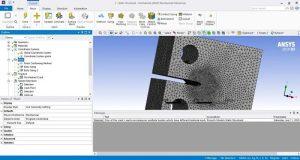
Tangkapan Layar
FAQs about ANSYS 2026 R1 Student
Apa itu ANSYS Fluent?
ANSYS Fluent adalah software simulasi Computational Fluid Dynamics atau CFD yang digunakan untuk menganalisis aliran fluida, perpindahan panas, serta berbagai fenomena fisika yang berkaitan dengan fluida dalam model teknik.
Apakah ANSYS 2026 R1 Student cocok untuk mahasiswa?
Ya, ANSYS Student ditujukan untuk kegiatan pembelajaran dan pengembangan kemampuan simulasi teknik. Mahasiswa dapat menggunakannya untuk memahami CFD, thermal analysis, dan berbagai konsep simulasi sesuai dengan fitur serta batasan edisi Student.
Apakah ANSYS Fluent dapat digunakan untuk simulasi CFD?
Ya, Fluent merupakan salah satu software CFD yang digunakan untuk mempelajari dan menganalisis aliran fluida, tekanan, kecepatan, turbulensi, serta perpindahan panas pada berbagai model teknik.
Apakah ANSYS Student gratis?
ANSYS menyediakan edisi Student untuk tujuan pendidikan dengan ketentuan serta batasan tertentu. Pengguna perlu memeriksa informasi resmi mengenai ketersediaan, lisensi, dan fitur yang disertakan pada versi yang ingin digunakan.
Apakah ANSYS 2026 R1 Student tersedia untuk Windows?
ANSYS Student menyediakan paket untuk sistem operasi Windows yang didukung. Sebelum menginstal, periksa persyaratan sistem resmi agar komputer Anda memenuhi ketentuan kompatibilitas.
Apakah ANSYS Fluent sulit digunakan untuk pemula?
ANSYS Fluent memiliki berbagai pengaturan teknis yang membutuhkan pemahaman dasar tentang fluid mechanics, meshing, dan numerical methods. Pemula dapat mulai dengan tutorial sederhana, seperti aliran dalam pipa atau simulasi perpindahan panas, sebelum mengerjakan model yang lebih kompleks.
Untuk apa ANSYS Fluent digunakan dalam teknik mesin?
Fluent dapat digunakan dalam teknik mesin untuk mempelajari airflow, sistem pendingin, aliran fluida dalam pipa, heat exchanger, thermal management, dan berbagai aplikasi CFD lainnya sesuai dengan model yang dibuat.
Bagaimana cara mengatasi ANSYS Fluent yang lambat?
Performa simulasi dapat dipengaruhi oleh ukuran mesh, jumlah elemen, pengaturan solver, RAM, CPU, dan kompleksitas model. Pengguna dapat mengevaluasi mesh, menyederhanakan geometri yang tidak penting, dan memastikan komputer memenuhi persyaratan sistem.
Kesimpulan
ANSYS 2026 R1 Student merupakan software simulasi engineering yang dapat membantu mahasiswa mempelajari CFD, analisis fluida, perpindahan panas, dan berbagai proses teknis melalui pendekatan numerik. Fluent menyediakan workflow untuk menyiapkan geometri, membuat mesh, mengatur simulasi, menjalankan solver, serta mengevaluasi hasil. Bagi pengguna yang mencari ANSYS Kuyhaa, penting untuk memahami fungsi software, persyaratan komputer, dan ketentuan lisensi Student sebelum melakukan instalasi. Dengan mempelajari dasar-dasar simulasi serta menggunakan pengaturan yang tepat, ANSYS dapat menjadi alat pembelajaran yang bermanfaat untuk mendukung proyek akademik dan pengembangan keterampilan teknik. Anda juga dapat mengunduh: Kaspersky Total Security Kuyhaa
PENTING: Untuk menghindari unduhan yang salah! Pastikan ukurannya cocok/mirip dengan informasi persis yang tersedia di Kuyhaa-me.id.
Download Now [Kata Sandi 12345]